You're always in control
You sign in on HMRC's own website, not ours — so we never see your Government Gateway password. The connection uses HMRC's official, secure system, and you can revoke EasyTaxer's access at any time from your HMRC account.
What "connecting to HMRC" means
Making Tax Digital works through HMRC's official APIs. For EasyTaxer to fetch your tax obligations and submit your updates, you give it permission — once — to act on your behalf. This is done with HMRC's standard, secure authorisation system (the same kind of "sign in with…" flow you'll have used elsewhere). Your password stays with HMRC; EasyTaxer only ever receives a secure access token, never your credentials.
The three steps
Start the connection from EasyTaxer
When you first need to talk to HMRC, EasyTaxer will offer to connect. Choosing to connect takes you to HMRC's secure sign-in page.
Sign in on HMRC's website
Enter your HMRC sign-in details on HMRC's own page — your Government Gateway user ID and password, or your GOV.UK One Login email address and password. This happens entirely on GOV.UK — EasyTaxer never sees what you type.
Grant authority & return
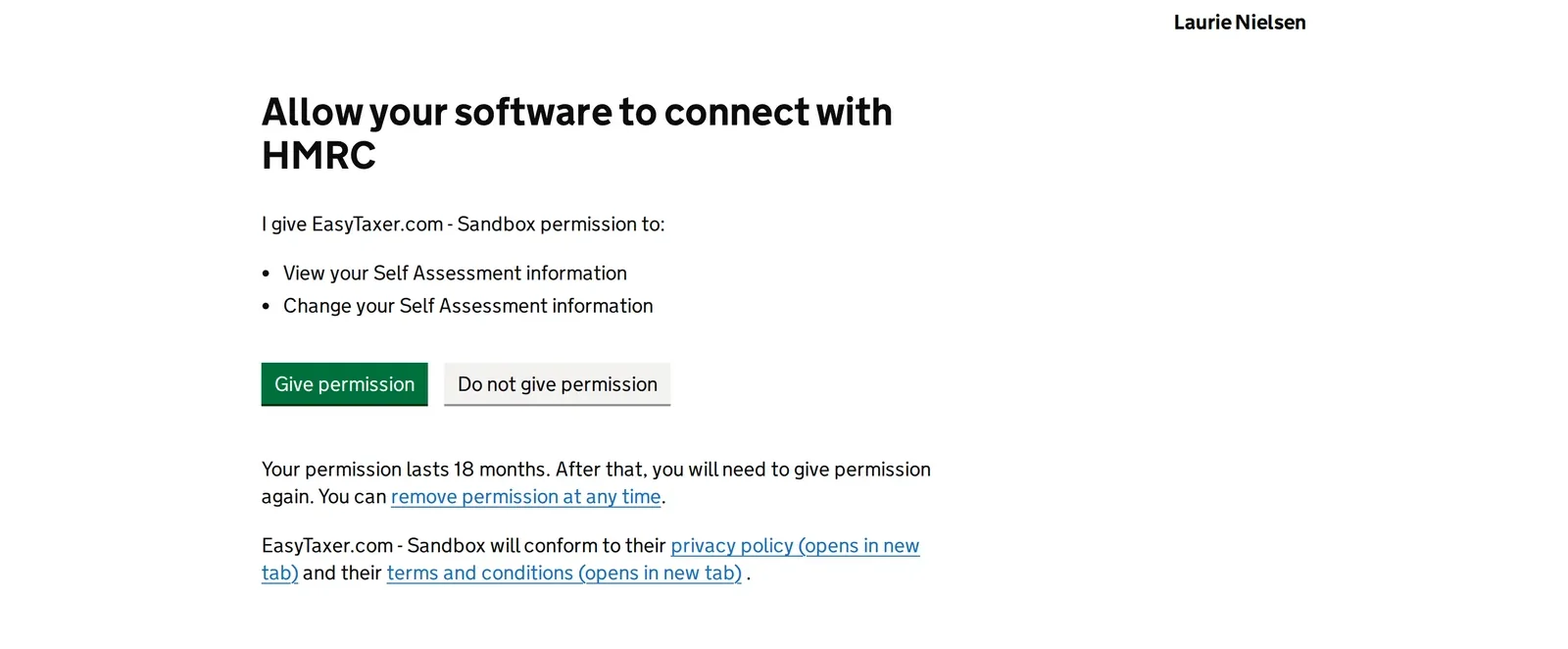
HMRC shows you what EasyTaxer is asking permission for. Approve it, and you're sent straight back to EasyTaxer — now connected and ready to submit.
Don't have a Government Gateway user ID yet?
You sign in to HMRC online services in one of two ways: with a Government Gateway user ID (up to 12 characters) and password, or with GOV.UK One Login (an email address and password). Most people who've filed a Self Assessment return online already have sign-in details — keep using the ones you have. Never used HMRC online services? You can create one as you sign in:
- 1 When EasyTaxer sends you to HMRC's sign-in page (step 2 above), select “Create new sign in details” — even if you already have GOV.UK One Login details from another government service. Or start on GOV.UK › HMRC online services: sign in or set up an account.
- 2 HMRC tells you whether you need to create a GOV.UK One Login or a Government Gateway user ID, and guides you through setting it up.
- 3 If HMRC gives you a Government Gateway user ID, write it down — you'll need it every time you sign in. With GOV.UK One Login you sign in with your email address instead.
- 4 If you're asked what kind of account you need, choose “Individual”. Then come back and finish connecting (steps 2 and 3 above).
You'll also need to be registered for Self Assessment — so HMRC has issued you a Unique Taxpayer Reference (UTR) — and have your National Insurance number to hand. Not registered for Self Assessment yet? See how to register on GOV.UK.
What permissions you're granting
HMRC will ask you to allow EasyTaxer to read and submit your Making Tax Digital for Income Tax information. In plain terms, that lets EasyTaxer:
- Read your obligations — see which quarterly updates and declarations are due, so it can remind you.
- Submit your figures — send your quarterly updates, year-end figures and final declaration to HMRC.
- Retrieve your tax calculation — fetch HMRC's calculation so you can see your estimated bill.
Good to know
The permission is scoped to your Income Tax records only. It does not give EasyTaxer access to make payments, change your bank details, or see unrelated parts of your HMRC account.
How your data is protected
- Your data is encrypted at rest with AES-256 on secure UK servers.
- We never store your Government Gateway password — only a secure HMRC access token.
- You can revoke EasyTaxer's access at any time from your HMRC online account.
Video: How to remove a software's access to your HMRC account (Making Tax Digital)
Text version of this video
-
The short answer
You can remove a software's access to your HMRC account yourself, at any time. You do it on HMRC's own service on GOV.UK, called Manage permissions for tax software.
-
What the service does
The service lets you do two things. Check which software you've given permission to. And remove permission from any software, for example permission to file your return.
-
How to do it
Search GOV.UK for Manage permissions for tax software, and select Start now. Sign in to HMRC. You'll be told when you sign in if you need to prove your identity. Then find the software in your list, and remove its permission.
-
Connecting again
Permission doesn't last for ever anyway. For Making Tax Digital, HMRC asks you to connect your software again every 18 months, and your software should remind you. If you remove access and want it back, you connect again the same way: choose the option to connect with HMRC in your software, sign in, and give permission.
-
The same goes for us. You can remove EasyTaxer's access at any time in your own HMRC online account. You do not have to ask us.
-
EasyTaxer is recognised by HMRC for Making Tax Digital for Income Tax. You'll find it at easytaxer.com.
Common questions
Will EasyTaxer see my password?
No. You sign in on HMRC's own website. EasyTaxer only receives a secure access token afterwards — never your password.
Can I disconnect later?
Yes. You can revoke access from your HMRC online account whenever you like, and re-connect later if you need to.
What if the connection expires?
HMRC connections refresh automatically in the background. If a re-authorisation is ever needed, EasyTaxer will prompt you to reconnect in a few clicks.
Next: make your first update
Once you're connected, submitting to HMRC takes just a few clicks.
How to submit a quarterly update